Create and open applications
Before you start
You need Operator or Administrator access to provision services. Application users receive only the instances allowed by their role and sharing policy. Have a ready model when the selected application needs inference.
Create an instance
- Open Services. Applications, AI Runtime and Platform describe different kinds of components, not separate installation products.
- Choose the application and create an instance. Fill only the fields offered by its catalog-backed form; required modules are reconciled by the platform.
- Review model selection, storage, access requirements and generated local/public URLs.
- Wait for the instance to be ready, then open its discovered URL.
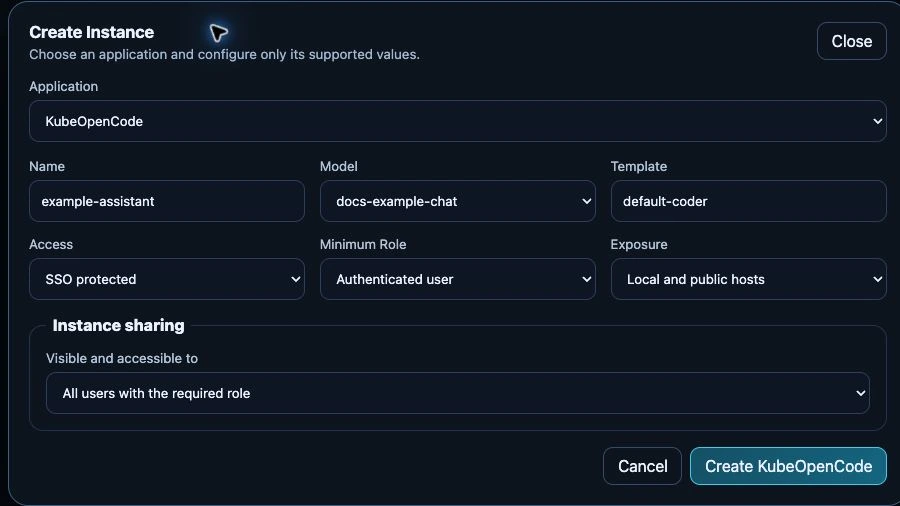
Unsubmitted test-appliance form, 24 September 2026. The selected model is the documentation test model; the neutral instance name is only a draft. No application or access-policy change was submitted for this capture.
Use Credentials only when the application exposes a credential panel and your role permits access. A URL being present does not bypass SSO or instance access rules. See sharing to grant selected users or groups access.
Stop or remove components safely
Review instance dependencies and persistent-data retention before removing a service. Disabling a shared runtime can affect several applications. Back up databases and documents before destructive changes; deleting an instance is not a backup mechanism.
Verify
Open the application as an intended user, make a small request and verify its chosen model. For a failure, inspect the instance status before changing generated Helm resources manually. See application troubleshooting and configuration reference.