System architecture
AIppliance Magic Stick is split into reusable layers for public read-only bootstrap, runtime configuration, and optional advanced GitOps overlays.
At a glance
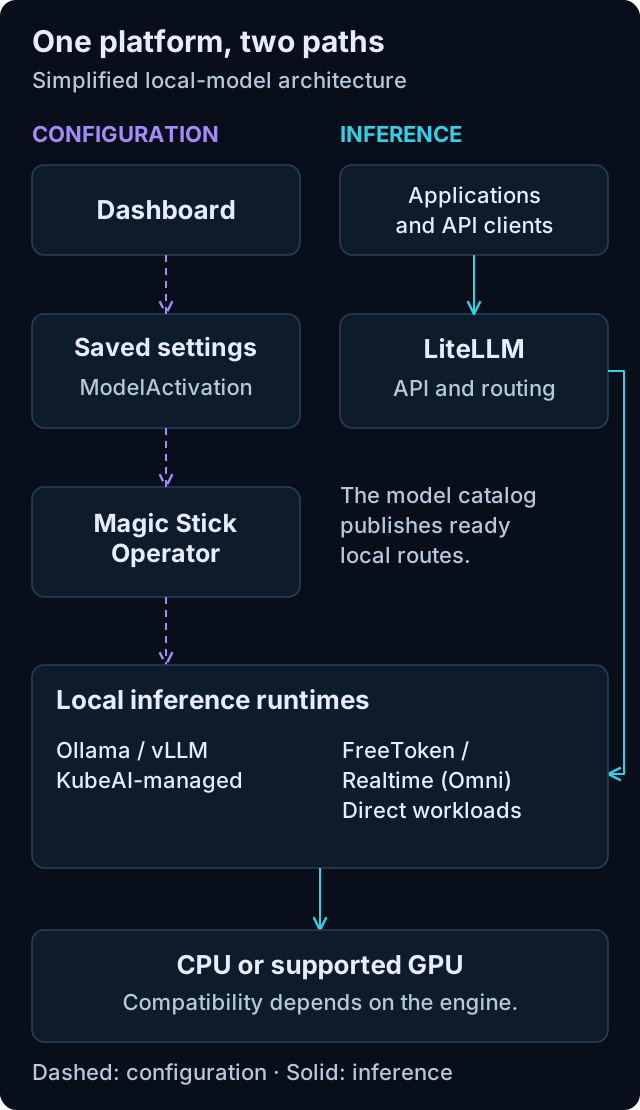
Simplified local-model view. Open the diagram for full-size labels.
The dashboard changes the desired configuration; it does not forward inference requests or create Pods directly. The Magic Stick Operator manages ordinary Ollama/vLLM models through KubeAI and FreeToken/Realtime through direct workloads. The model catalog publishes ready local routes to LiteLLM, which handles requests from applications and API clients. Each engine retains its own hardware support.
The diagram omits authentication, module provisioning and external-provider routes. Those are described below and in model routing and identity and security.
Repository Layers
| Layer | Path | Responsibility |
|---|---|---|
| Installer | magic-installer |
Builds bootable Ubuntu autoinstall media with cloud-init metadata. |
| Host automation | magic-host |
Installs and reconciles the local host with Ansible, K3s, and Flux. |
| Cluster bases | magic-cluster |
Reusable Flux, platform, app, GPU, and profile bases. |
| Examples | examples |
Render-only public overlays using example.local values. |
| Documentation | docs |
Public contract, operations, development, and release notes. |
The public repository must stay deployment-neutral. Real secrets, domains, and storage sizing are supplied through installer metadata, dashboard settings, runtime CRs, Kubernetes Secrets, or optional external overlays.
Bootstrap Flow
Installer image
  -> Ubuntu autoinstall and cloud-init
  -> /etc/default/ai-appliance-repo
  -> /usr/local/sbin/ai-appliance-converge
  -> Ansible playbook magic-host/playbooks/local.yml
  -> K3s
  -> Flux
  -> Flux graph under magic-cluster/flux/graph/base
  -> First-run namespace and ApplianceSetup CRD
  -> Physical console handoff from claim page to authenticated TUI
  -> Shared Node Feature Discovery
  -> Magic Stick Operator CRD, module catalog, and default Appliance
  -> platform and app Kustomize bases
The converge runner is installed as host automation and can be rerun manually. It updates the pinned public checkout and runs the public Ansible playbook with the configured inventory. In optional GitHub bootstrap mode it can also update an external deployment checkout.
Bootstrap Modes
| Mode | Behavior | When to use |
|---|---|---|
readonly-public |
Flux reads this public repository directly and applies a public profile path. No Git token is required. | Safe demos, local appliance bring-up, and public template validation. |
github |
Flux bootstraps an external GitHub deployment repository and applies a sync manifest that can include this public repository. | Advanced GitOps deployments that need separate overlay ownership. |
Flux Graph
The base graph is defined under magic-cluster/flux/graph/base.
| Wave | Flux Kustomization | Path | Depends on |
|---|---|---|---|
| 00 | infrastructure-basis |
magic-cluster/platform/basis |
none |
| 02 | first-run-bootstrap |
magic-cluster/platform/first-run-setup |
none |
| 03 | hardware-discovery |
magic-cluster/platform/hardware-discovery |
infrastructure-basis |
| 05 | envoy-gateway |
magic-cluster/platform/gateway/envoy-gateway |
infrastructure-basis |
| 10 | identity-pilot |
magic-cluster/platform/identity |
first-run-bootstrap, envoy-gateway |
| 15 | magicstick-operator |
magic-cluster/platform/magicstick-operator |
infrastructure-basis, hardware-discovery |
| 30 | apps |
magic-cluster/apps/dashboard |
infrastructure-basis, identity-pilot |
The shared, lightweight NFD service is part of the static graph. Optional AI,
vendor GPU, and instance resources are not. The Magic Stick Operator creates generated Flux
Kustomization resources from ModuleActivation, runtime resources from
ModelActivation, and Flux HelmRelease resources from AppInstance CRs. Ordinary
vLLM/Ollama use KubeAI; FreeToken and Realtime use direct managed Deployments/Services.
The first-run namespace and ApplianceSetup CRD are intentionally reconciled
before and independently of Envoy Gateway. Host automation can therefore
persist setup state even while the gateway and identity workloads are still
starting or reporting an unrelated error.
Appliance Model
Private Mesh extends the existing LiteLLM/model-catalog path through an optional core module, not a second inference stack. It adds one supervised transport/control-plane Pod with persistent identity, scoped dynamic aliases and a loopback export bridge. All appliance inference still passes through LiteLLM. The creator's signed membership is independent of Iroh relay connectivity.
The Appliance CRD is the Git-owned aggregate status surface. Runtime
selection happens through ModuleActivation, ModelActivation, and
AppInstance CRs. The base install includes:
- K3s and Flux from host automation
- base platform components
Appliance,ModuleActivation,ModelActivation, andAppInstanceCRDsConfigMap/magicstick-module-catalogandConfigMap/magicstick-app-catalog- live
magicstick-operatorcontroller - default
Appliance/localwith profileai-workstation
The default ai-workstation profile is GPU-neutral. It seeds litellm and
model-catalog so external providers work immediately, but it does not install
KubeAI or a vendor GPU operator. An ordinary CPU-backed vLLM/Ollama ModelActivation requests
KubeAI, while an accelerator-backed model additionally requires the
matching NVIDIA, AMD, or Intel provider module. vLLM maps all four compute
targets to a vendor-specific image and Kubernetes resource profile. Ollama maps
CPU, NVIDIA, and AMD to its corresponding KubeAI runtime profiles; Intel remains
vLLM-only. Intel dynamically chooses its xe or i915 vLLM profile.
Independently, NFD detection can request the
matching provider module. Existing runtime activations and explicit disables
remain authoritative during upgrades and temporary hardware-label loss.
The Magic Stick Operator is a meta-operator. It enables modules by generating
Flux Kustomization resources and creates one Flux HelmRelease per instance
after required modules and CRDs exist. Charts for OpenClaw, Hermes, Paperclip,
and KubeOpenCode create their specialized CRs. The Odysseus chart owns its
workloads directly because there is no upstream Odysseus operator.
The dashboard is the user-facing client for this model. It runs in the cluster,
reads the Appliance, module catalog, Flux, Pod, Service, Ingress, and Event
status, and creates or patches ModuleActivation, ModelActivation, and
AppInstance CRs. It does not install modules or create workload resources
directly.
Platform Components
| Area | Components |
|---|---|
| Basis | Namespaces, cert-manager, generated secrets, reloader, and Gateway-aware kdns. |
| Hardware discovery | One shared Node Feature Discovery deployment with periodic PCI relabeling. |
| Identity and human access | Envoy Gateway, local Keycloak identity broker, PostgreSQL, and route-level OIDC policies. |
| Appliance control plane | Appliance CRDs, module catalog, model presets, operator RBAC, and live controller. |
| AI modules | KubeAI, Hermes operator, OpenClaw operator, and Paperclip operator. |
| GPU providers | Hardware-triggered NVIDIA GPU Operator, AMD GPU Operator, and Intel Device Plugins Operator; NVIDIA also provides time-slicing. |
Application Components
| App | Path | Notes |
|---|---|---|
| Dashboard | magic-cluster/apps/dashboard |
Cluster landing page, app discovery surface, and Appliance CR UI/API client. |
| LiteLLM | magic-cluster/apps/ai/litellm/base |
In-cluster OpenAI-compatible API and model routing. |
| Model catalog | magic-cluster/apps/ai/model-catalog |
Syncs ready KubeAI, direct runtime and external models into LiteLLM and publishes generated catalog fragments. |
| AnythingLLM | magic-cluster/apps/ai/anything-llm/base |
Uses LiteLLM and the generated embedding default. |
| Runtime app instances | AppInstance CRs |
The Magic Stick Operator creates one Flux HelmRelease per instance; its chart owns the application resources. |
| KubeOpenCode | magic-cluster/apps/ai/kubeopencode |
Helm-managed KubeOpenCode controller and server module. |
Envoy Gateway is the only installed application gateway. The dashboard uses
authenticated local and public HTTPRoute resources plus API-level role
checks. LiteLLM, AnythingLLM, and KubeOpenCode require an authenticated Magic
Stick user. The bundled installation has no application Ingress resources. See
authentication.md.
Local mDNS discovery follows the same Gateway API model. Routes opt in with
lab42.io/mdns.enabled: "true"; kdns publishes only accepted .local
HTTPRoute hostnames and uses the programmed address and listener port from the
referenced Gateway. No discovery-only Ingress is required.
Value Boundary
The public repo provides reusable defaults and placeholders. Deployment-specific values must be supplied by:
/etc/default/ai-appliance-repoduring host bootstrapConfigMap/ai-appliance-settingsfor Flux post-build substitution- optional external Kustomize overlays and patches
- runtime-generated Kubernetes Secrets
- approved external secret management
Do not commit real domains, private IPs, personal data, tokens, kubeconfigs, private repository paths, or generated secrets to this repository.